Showing posts with label Utilities. Show all posts

Friday, March 21, 2014

Error p08 ( p,0,8 ) in Canon MP250. Reset ink counter. Cartridge reset.

Recently I solved a problem with a Canon MP250 that was not printing anything. Everytime there was a error message p,0,8 .
In the manual of Canon there is no reference about it. In internet I found the problem was in the ink level. Seems the following procedure resets the count of the cartridges.
It worked on my printer.

Instructions:

Shutdown the printer.
With the printer of press the Cancel-Reset button and hold it.
Press the Power-On button and hold it.
Now you can drop the Cancel-Reset button (still we have the Power-on pressed), and press the Cancel-Reset button two times.

You can drop the Power-on button
When appears the 0 in the display, press the Cancel-Reset 4 times.
Now press the Power-on button two times.
The printer will shutdown automatically.
Power on the printer and enjoy!

 Power-on button is number 1. Cancel-reset button i number 7

Tuesday, June 11, 2013

Suciedad en el pc,cómo limpiar un ordenador

Todos (o casi todos) los pc llevan ventiladores, éstos crean un circuito de aire para refrigerar los componentes de la máquina. Con el paso del tiempo es normal que el interior de un pc se llene de polvo y suciedad. Ésta suciedad afecta negativamente al rendimiento de la máquina, provocando que el aire no circule bien, taponando el disipador de los componentes.

Los componentes que llevan ventilador y deben ser de nuestra atención són:

- Procesador.
- Tarjeta gráfica (la integrada no lleva ventilador).
- Fuente de alimentación.
- Ventiladores traseros y frontales para augmentar la circulación del aire.
- Ventiladores adicionales para discos duros.

Además de provocar lentitud o incluso bloqueos en el pc por el calentamiento de los componentes, la suciedad provoca ruido. Hay equipos que tienen un sistema de seguridad cargado en BIOS que cuando el equipo sobrepasa una temperatura excesiva se detiene automáticamente. Otros equipos no disponen de este sistema y simplemente se bloquean. 
De vez en cuando es recomendable echar un vistazo al  interior del pc para comprobar el estado. Aquí os muestro unas imágenes de ejemplo:
Antes
Después


Antes
Después


En las imágenes del disipador del procesador se puede comprobar cómo el polvo estaba bloqueando casi por completo la refrigeración del procesador.

Para realizar a cabo la limpieza, se debe apagar y desconectar el equipo.
Las herramientas para limpiar el interior nunca deben contener líquido, nos podemos apañar con un pincel y un aspirador. Si es posible, un bote de aire comprimido nos puede ayudar mucho.

Herramientas:
- Aspirador
-Pincel / pinceles
- Bote de aire comprimido

Con el pincel podemos hacer saltar el polvo de las partes más inaccesibles y al mismo tiempo con el aspirador recogemos esa suciedad.
Hay que ir con cuidado de no romper las aspas de los ventiladores, ésto debe ser tomado en más consideración cuando se trate de limpiar el ventilador de una tarjeta gráfica, normalmente más pequeños y frágiles.
Tengo comprobado que el ordenador que hace circular aire del tabaco, es decir, el ordenador de un fumador que fuma cuando está con el pc, contiene una suciedad mucho más pegada, más consistente y más difícil de sacar.

La fuente de alimentación contiene también un ventilador. Acostumbra ser de difícil acceso, por lo que si se dispone de el bote de aire comprimido fantástico.

Si el ordenador está muy sucio, recomiendo realizar la limpieza en un sitio abierto.
Si os ha gustado o os ha sido de ayuda, por favor hacer un click en

Monday, May 13, 2013

Restore to factory default settings

From a few years ago the laptops manufacturers are not giving the restore Cd's. They have changed the cd's with a hidden Recovery Partition.
If you need to restore your laptop to factory settings, you can do it trough the manufacturer recovery system in the start menu or if you aren't able to start windows, and you still have the original partitions, you can start the computer from the Recovery Partition.

 *In some cases you need to activate the option before in the bios setup*

During the startup, when appears the logo of your manufacturer, press the key or combo key from your manufacturer:


BRAND
KEY
MANUFACTURER INSTRUCTIONS
Acer Alt+F10http://panam.acer.com
AsusF9http://support.asus.com
Toshiba0http://www.mytoshiba.com.au
Sony Vaio F10 o F8http://www.kb.sony.com
Packard BellF11 o Alt+F10 http://packard-bell-scandic.custhelp.com
DellCtrl + F11http://en.community.dell.com
Hp/CompaqF11http://h10025.www1.hp.com
Samsung F4 http://www.samsung.com
Lenovo F11 http://support.lenovo.com
Apple Command-R http://www.apple.com
Medion F3 Select your model and see the manual

It will start the recovery process to recovery the computer to factory defaults, restore the original applications and drivers, restore only one of the partitions... depending on the manufacturer. Some of them ask you if you want to make a previous backup before restoring.

Take care, options may erase all your data.
If you liked it or it was useful, please click on

Monday, March 11, 2013

Ethernet cable and cross wired cable


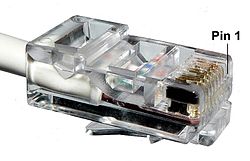
Ethernet cables connect network devices such as computers, modems, routers, and adapters. They transmit data using the Ethernet protocol. Ethernet cables have RJ-45 jacks on both ends, each with 8 pins.
Some Ethernet cable wires criss-cross internally, others are straight through, meaning that pin 1 is wired to pin 1 on the other end, etc
There are two standards, 568A used in most cases in U.S.A. and 568B, used mostly in Europe.


An Ethernet crossover cable is a type of Ethernet able used to connect computing devices together directly. Normal straight through or patch cables were used to connect from a host network interface controller (a computer or similar device) to a network switch, hub or router. A cable with connections that "cross over" was used to connect two devices of the same type: two hosts or two switches to each other. Owing to the inclusion of Auto-MDIX capability, modern implementations of the Ethernet over twisted pair standards usually no longer require the use of crossover cables. 


To make a 10BASE-T or 100BASE-T crossover cable you need to have one end with EIA/TIA-568B and the other EIA/TIA-568A.

To make a 1000BASE-T crossover cable (also 100BASE-T and 10BASE-T) you need to cross all the pairs.
Introduced in 1998, this made the distinction between uplink and normal ports and manual selector switches on older hubs and switches obsolete.
If one or both of two connected devices has the automatic MDI/MDI-X configuration feature there is no need for crossover cables.

Routers default password


And all missing almost more of the same


Model USER PASSWORD
3Com 812 adminttd or (root! or admintde)adminttd or (root! or admintde)
3Com Wireless 11g No user 1234admin
3CRWDR100Y72 3Com No user admin
Alcatel Speed ​​Touch adminttd
admintde
admintte
admin
ttdadmin
1234
! Root
root
vienna
adminttd
admintde
admintte
admin
ttdadmin
1234
! Root
root
vienna
Comtrend 500 root root
Comtrend 535 1234 1234
D-Link 504G admin admin
D-Link G604T admin admin
Inventel DW-B-200 admin admin
Linksys BEFSR41 admin admin
Linksys WAG354G admin admin
Nokia M1112 adminttd adminttd
SMC WBRA 7804 No user smcadmin
SMC WBRPG 2084 No user smcadmin
SpeedStream 5660 No user 1234 or admintde
U.S. Robotics 9105 admin admin
U.S. Robotics 9003 admin admin
U.S. Robotics 9106 admin admin
Xavi 7768 1234 1234
Zyxel 643 1234 1234
Zyxel 650/660HW 1234 1234